【セール中】💧 Real Wet System 【汎用アバター対応】
- ダウンロード商品Real Wet System¥ 980
- ダウンロード商品Real Wet System + Game & App Integration & Distribution License¥ 9,800
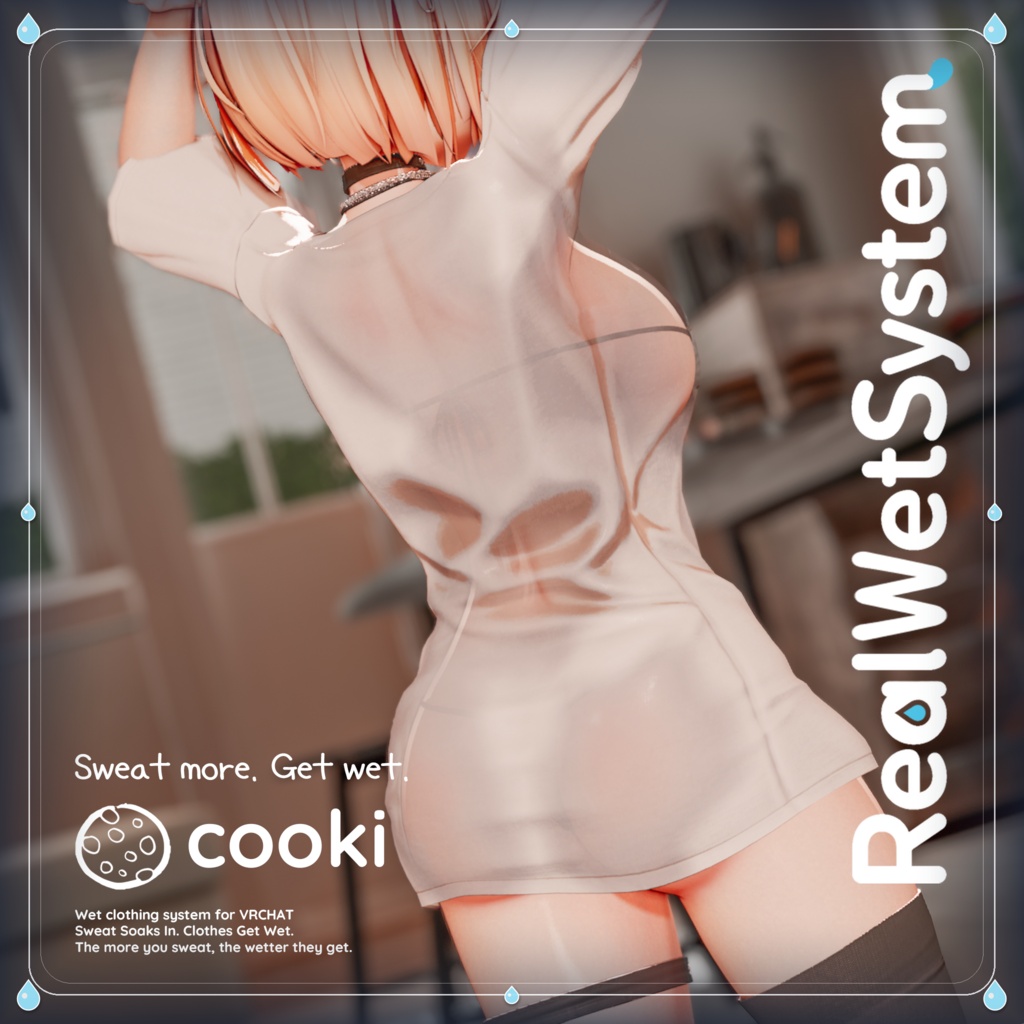
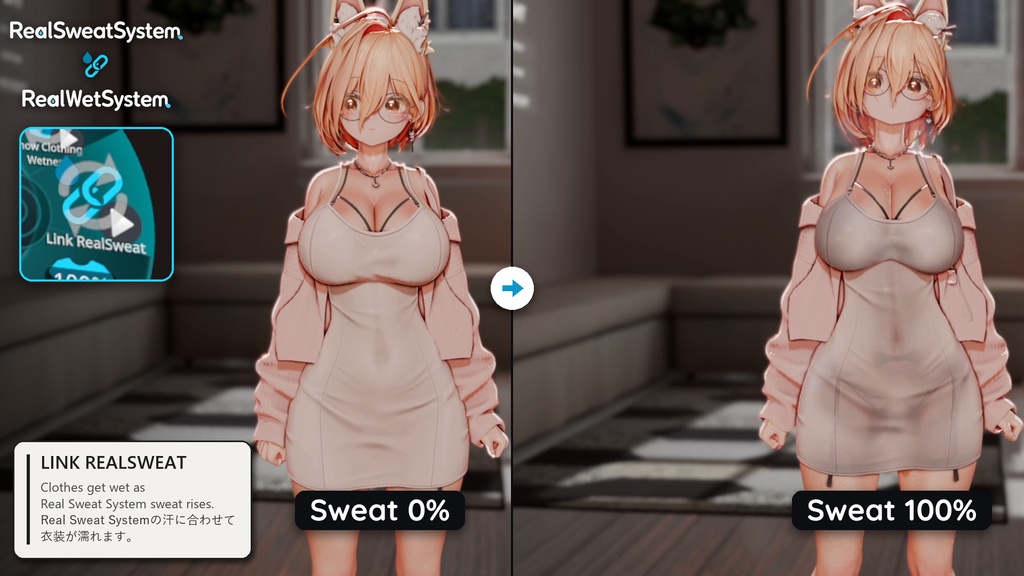
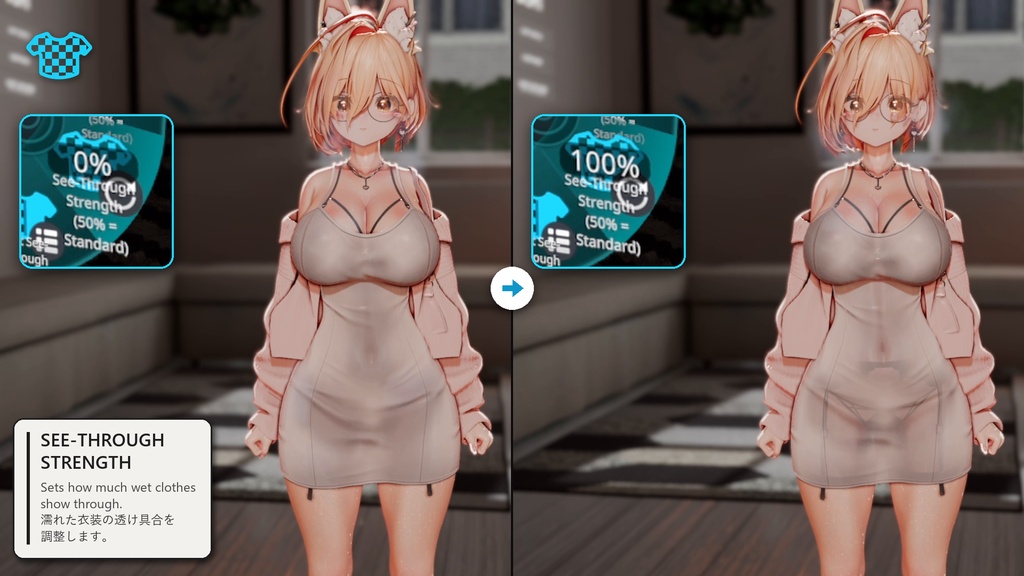
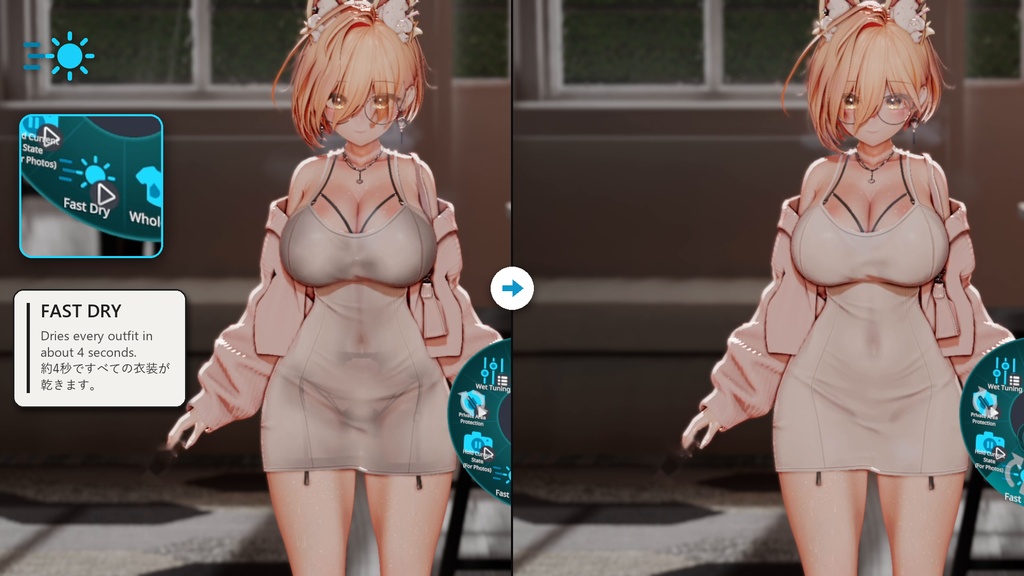
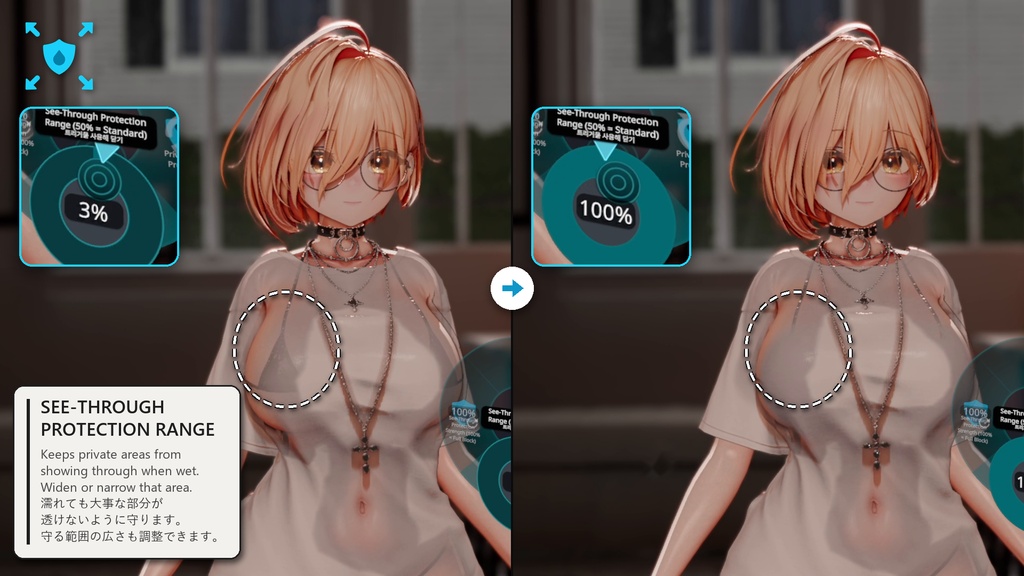
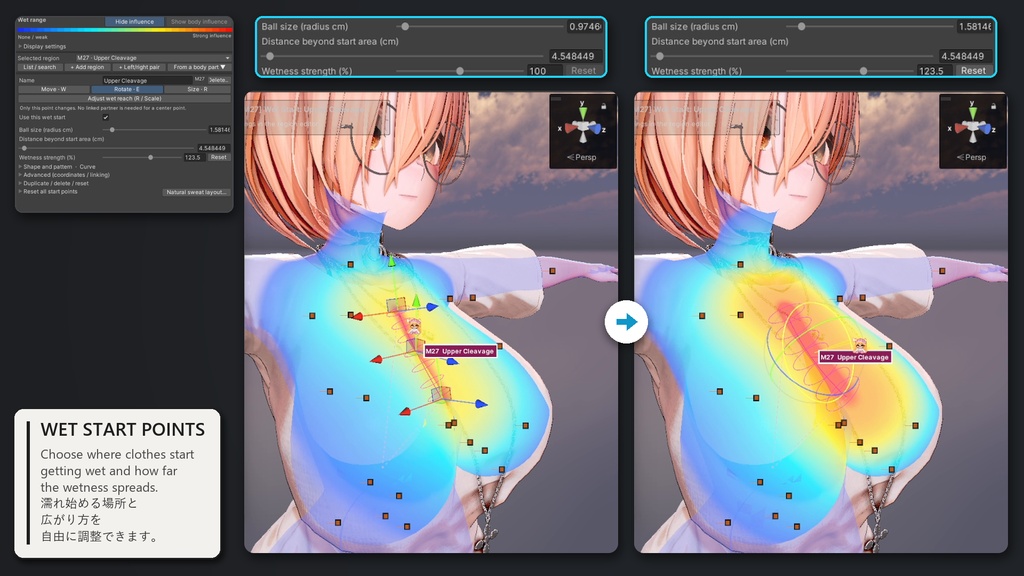
【発売記念価格】980円:11月8日(日)23:59まで → 1,280円:11月22日(日)23:59まで → 11月23日(月)から1,580円(通常価格)。 [Launch price] 980 JPY until Nov 8, 23:59 JST → 1,280 JPY until Nov 22, 23:59 JST → 1,580 JPY (regular) from Nov 23. ━━━━━━━━━━━━━━━━━━━━ Official Documentation / 公式ドキュメント / 공식 문서 https://cookipiece.github.io/RealWetSystem-Docs/ Instruction / 導入動画 https://youtu.be/gcIsCPVP9ls Real Sweat System (sold separately / 別売り) https://cooki.booth.pm/items/8645678 Image settings / 画像の設定 Maximum Wet Range 75% / Wet Appearance 18% / See-Through Strength 100% / Wet Edge 89% 最大の濡れ範囲75%/濡れ表現18%/透け強度100%/濡れの境界89% ━━━━━━━━━━━━━━━━━━━━ Sweat soaks in. Clothes get wet. Real Sweat System makes the skin sweat. Real Wet System makes the clothes wet. Use both, and the clothes get wet on their own as you sweat. Real Wet System is a PC-only tool that adds a wet look to the clothing of VRChat avatars: deeper color, wet gloss and see-through. Control it from 0–100% with the "Wet" menu. It also works on its own without Real Sweat System. ■ INSTALLATION First, activate your purchase once on this PC (see "Purchase Activation / 購入認証" below). Then open: CookiTools → RealWetSystem → Setup / Uninstall Select the avatar, check the four steps, then press [Install]. In the outfit window, press [Add Recommended] or tick the outfits and press [Add Selected Outfits]. Check 0% → 50% → 100% in the preview, then upload. ■ CHOOSE ONE VERSION Real Wet System ・Personal license (up to 3 of your own PCs) Real Wet System + Game & App Integration & Distribution License ・For putting it into games or apps (up to 10 PCs of the same team) Both contain the same files. ■ FEATURES ・Choose where wetness starts: from sweat spots, from where the clothes touch the body, or both ・"Whole Area" in-game switch: wets the whole outfit evenly (off by default) ・Fabric type, wet look strength and see-through per outfit, per part and per material ・New outfits: only outer clothes turn see-through, underwear stays opaque (recommended default) ・Private Area Protection: chest and crotch areas are placed at install. They still get wet; only the see-through is blocked. Range and strength can be changed in game. ・Even wet look: white, bright and strong-matcap clothes get wet like the rest ・Preview = upload: the same settings and the same calculation ・Never stops your build: a part that cannot get wet is uploaded dry, with the reason in the NDMF build result ・Works on most avatars and outfits made with Poiyomi Toon / Pro or lilToon (tested on 120+ outfits). Experimental: PCSS4VRC (lilToon), lilSSRT 1.4.3 (see "Requirements & Notes") ・English / Japanese / Korean UI ・Automatic VRChat menu, parameter and FX setup ■ WITH REAL SWEAT SYSTEM ・Turn on "Link RealSweat" and the clothes follow Sweat % (Real Sweat System 2.0.0 recommended). ・Real Sweat System 2.0.0 or later must also be activated on the same PC. If it is not, Real Sweat System is left out of that upload, and the linked clothes stay dry. ・Without Real Sweat System, use the "Wetness Amount" dial in the "Wet" menu. ・Real Rain System (coming soon): rain-wet clothes are drawn by Real Wet System, so it needs both. ・Each product is sold separately. ■ OPTIMIZER COMPATIBILITY AAO (Trace and Optimize), d4rk Avatar Optimizer, TexTransTool, VRCFury and MA material swaps are checked against the final build result. Your saved settings are never changed. ━━━━━━━━━━━━━━━━━━━━ 日本語 ━━━━━━━━━━━━━━━━━━━━ 汗がにじみ、服が濡れる。 Real Sweat Systemは肌に汗を、Real Wet Systemは衣装に濡れを加えます。両方使うと、汗をかくにつれて衣装も自然に濡れていきます。 Real Wet Systemは、VRChatアバターの衣装に、濡れた色・濡れたつや・透けを加えるPC向けツールです。 「濡れ」メニューから0~100%で調整できます。Real Sweat Systemがなくても単体で使えます。 ■ 導入方法 まず、このPCで一度だけ購入認証を行ってください(下記「Purchase Activation / 購入認証」)。 次にUnity上部メニューから CookiTools → RealWetSystem → Setup / Uninstall を開き、アバターを選び、4つの手順を確かめて[インストール]を押します。 衣装選択ウィンドウで[おすすめどおり追加]を押すか、衣装にチェックを入れて[選んだ衣装を追加]を押します。 プレビューで 0% → 50% → 100% を確かめてからアップロードします。 ■ 商品バリエーション Real Wet System ・個人ライセンス(購入者ご本人のPC 3台まで) Real Wet System + Game & App Integration & Distribution License ・ゲーム・アプリへの組み込み用(同じチームのPC 10台まで) どちらも同じファイルです。 ■ 主な機能 ・濡れ始める場所を選べます:汗をかく所から/体に触れる所から/両方 ・ゲーム内の「全範囲濡れ」:衣装全体を均一に濡らします(初期状態はOFF) ・衣装ごと、パーツごと、マテリアルごとに、生地の種類・濡れた感じの強さ・透け方を設定できます ・新しい衣装は上着だけ透け、下着は透けません(推奨の初期設定) ・大事な部分の透け防止:胸・股の保護範囲をインストール時に配置します。保護範囲も濡れ、透けだけを防ぎます。範囲と強さはゲーム内で変えられます。 ・均一な濡れ表現:白い服、明るい服、マットキャップの強い服も、ほかの服と同じように濡れて見えます ・プレビュー=アップロード:同じ設定・同じ計算を使います ・ビルドを止めません:濡れを適用できなかったパーツだけが乾いたままアップロードされ、理由がNDMFのビルド結果に残ります ・Poiyomi Toon/Pro・lilToonの衣装なら、ほとんどのアバター・衣装で使えます(120着以上で確認)。実験機能:PCSS4VRC(lilToon)・lilSSRT 1.4.3(詳細は下記「動作要件・注意」) ・日本語/英語/韓国語UI ・VRChatメニュー、パラメータ、FXの自動セットアップ ■ Real Sweat Systemとの連携 ・「RealSweat連動」をONにすると、衣装がSweat %に合わせて濡れます(Real Sweat System 2.0.0推奨)。 ・Real Sweat System 2.0.0以降も、同じPCで購入認証が必要です。認証していない場合、そのアップロードではReal Sweat Systemが外れ、連動している衣装は乾いたままになります。 ・Real Sweat Systemがない場合は、「濡れ」メニューの「濡れ量」で調整します。 ・Real Rain System(準備中):雨で濡れた衣装はReal Wet Systemが描くため、両方が必要です。 ・それぞれ別売りです。 ■ 最適化ツールとの併用 AAO(Trace and Optimize)、d4rk Avatar Optimizer、TexTransTool、VRCFury、MAのマテリアル切り替えは、最終的なビルド結果に合わせて確認します。保存された設定は変更しません。 ⚠️ COMPATIBILITY NOTICE / 互換性に関する注意 / 호환성 주의 If you use VRCFury, use 1.1436.0 or later. With VRCFury 1.1258 or older, all clothes stay dry. Tools that change outfit meshes during upload (vertex order, submeshes or mesh structure), such as anti-ripping or polygon reduction tools, may be incompatible. A part that cannot be matched is uploaded dry, with the reason in the NDMF build result. VRCFuryを使う場合は1.1436.0以降をお使いください。VRCFury 1.1258以前では、すべての衣装が乾いたままになります。 アップロード時に衣装メッシュ(頂点順序・サブメッシュ・メッシュ構造)を変更するツール(Anti-Ripping、ポリゴン削減など)とは併用できない場合があります。対応できなかったパーツは乾いたままアップロードされ、理由はNDMFのビルド結果に表示されます。 VRCFury를 쓴다면 1.1436.0 이상을 써 주십시오. VRCFury 1.1258 이하에서는 모든 옷이 마른 채로 올라갑니다. Real Sweat System 2.0.0 이상과 연동하려면 같은 PC에서 Real Sweat System도 구매 인증해 주십시오. 업로드할 때 의상 메쉬(정점 순서·서브메쉬·메쉬 구조)를 바꾸는 도구(Anti-Ripping, 폴리곤 줄이기 등)와는 함께 쓸 수 없을 수 있습니다. AAO·d4rk Avatar Optimizer·TexTransTool은 지원합니다. 맞출 수 없는 파츠는 마른 채로 올라가고, 이유는 NDMF 빌드 결과에 나옵니다.
Terms of Service
Personal commercial use by the purchaser is permitted, including monetized videos, livestreams, image creation, and use on VRChat avatars uploaded to the purchaser's own account. If this product's functions or data are incorporated into a game or application and the completed build is distributed to third parties, whether paid or free, a separate Game & App Integration & Distribution License is required. The Game & App Integration & Distribution License is available to one individual or one circle, sole proprietor, or corporation with no more than five total members. Organizations with six or more members, affiliated companies, external clients, and publishers require a separate agreement. The applicable scope and conditions are governed by the license product page and the included license terms. The Game & App Integration & Distribution License grants usage rights only. Implementation, modification, compatibility assistance, and other technical support for non-VRChat environments are not included. A VRChat avatar is not a game or application. Avatars or avatar packages that contain Real Wet System files or generated data may not be distributed, whether paid or free. Each user must buy and install their own copy. Sharing, redistribution, resale, transfer, or public disclosure of the included product data is prohibited. 購入者本人による商用利用(収益化された動画・配信・画像制作、および購入者本人のアカウントにアップロードしたVRChatアバターでの利用)は可能です。 本製品の機能またはデータをゲーム・アプリに組み込み、完成ビルドを第三者へ配布する場合は、有償・無償を問わず、別途「Game & App Integration & Distribution License」が必要です。 Game & App Integration & Distribution Licenseは、個人1名、または構成員が合計5名以下の1つのサークル・個人事業主・法人を対象とします。構成員が6名以上の組織、関連会社、外部クライアントおよびパブリッシャーによる利用は別途協議が必要です。詳細な適用範囲および条件は、当該ライセンス商品ページと同梱のライセンス規約に従います。 Game & App Integration & Distribution Licenseは利用権のみを付与するものであり、VRChat以外の環境への導入、改変、互換性対応、その他の技術サポートは含まれません。 VRChatアバターはゲーム・アプリに当たりません。Real Wet Systemのファイルや生成データを含むアバター・アバターパッケージは、有償・無償を問わず配布できません。使う方それぞれが購入し、導入してください。 同梱データの共有・再配布・再販売・譲渡・公開を禁止します。 구매자 본인의 상업적 이용(수익화 영상·방송·이미지 제작 및 본인 계정에 업로드한 VRChat 아바타 이용)은 가능합니다. 본 제품의 기능 또는 데이터를 게임·앱에 포함하여 완성된 빌드를 제3자에게 배포하는 경우에는 유료·무료 여부와 관계없이 별도의 Game & App Integration & Distribution License가 필요합니다. Game & App Integration & Distribution License는 개인 1인 또는 전체 구성원 5명 이하인 1개 서클·개인사업자·법인을 대상으로 합니다. 6명 이상의 조직, 계열사, 외부 고객사 및 퍼블리셔의 이용은 별도 협의가 필요하며, 세부 적용 범위와 조건은 해당 라이선스 상품 및 동봉된 라이선스 약관을 따릅니다. Game & App Integration & Distribution License는 이용 권한만 제공하며, VRChat 외 환경에 대한 도입·개조·호환성 대응 및 기타 기술 지원은 포함하지 않습니다. VRChat 아바타는 게임·앱이 아닙니다. Real Wet System의 파일이나 생성 데이터가 들어 있는 아바타·아바타 패키지는 유료·무료와 관계없이 배포할 수 없습니다. 쓰는 사람마다 직접 구매해 설치해야 합니다. 동봉 데이터의 공유·재배포·재판매·양도·공개를 금지합니다. Full License Terms / 詳細規約 / 전체 약관: https://drive.google.com/drive/folders/1DXacbEwuGjz7HFnAagSOR_x8Vj6msIZv
Update information
2026-11-07 — v1.0.1: If the Install button is greyed out, the reason is now shown right above it. Avatars placed straight from an FBX can be installed without Unpack. 2026-11-06 — v1.0.0: Initial release.
Purchase Activation / 購入認証
■ Purchase activation ・Once per PC, enter your BOOTH order number in Unity: CookiTools > RealWetSystem > Purchase Activation. Windows Unity only (Mac and Linux cannot activate, and uploads from them leave the wet look out). ・Up to 3 PCs at a time for a personal license, 10 for the Game & App license. When you change PCs, press [Release this PC] (each order can add up to 5 new PCs per 30 days, 12 for Game & App). ・Activation lasts 30 days and renews by itself when you open the project online (connect at least once every 3 weeks). Only new installs need it; adding outfits, changing settings, updates, removal and avatars you already uploaded are not affected. Uploading from a PC that is not activated leaves the wet look out. ・Each Cooki tool is activated separately. If you bought Real Sweat System or Real Rain System in the same order, enter the same order number in each tool. ・If the activation server is ever shut down, we will announce it at least 3 months ahead and publish a version that works without activation. A permanent unlock file is also held by a trusted third party. ・Activation sends your order number, a random PC ID and an optional PC name through Cloudflare (US) to the activation server (South Korea). No name or email address is sent. ・Guide: https://cookistudio.com/license/ / Terms: https://drive.google.com/drive/folders/1DXacbEwuGjz7HFnAagSOR_x8Vj6msIZv / Privacy: https://cookistudio.com/license/privacy / Contact: BOOTH message Note: The "Real Wet System + Game & App Integration & Distribution License" variation can be activated on up to 10 PCs of the same team or company at the same time ("Real Wet System": up to 3 of the buyer's own PCs at the same time). ━━━━━━━━━━━━━━━━━━━━ 日本語 ━━━━━━━━━━━━━━━━━━━━ ■ 購入認証について ・PCごとに一度、Unityの CookiTools > RealWetSystem > Purchase Activation でBOOTHの注文番号を入力します。WindowsのUnityのみ対応です(Mac・Linuxでは認証できず、そこからアップロードすると濡れ表現が外れます)。 ・同時に使えるPCは、個人ライセンス3台、Game & Appライセンス10台までです。PCを替えるときは[このPCを解除]を押してください(新しく登録できるPCは1件の注文につき30日に5台、Game & Appは12台まで)。 ・認証は30日間有効で、インターネットに接続して開くと自動で更新されます(3週間に一度以上の接続が必要です)。認証が必要なのは新規インストールだけで、衣装の追加・設定変更・アップデート・削除やアップロード済みのアバターには影響しません。認証していないPCからアップロードすると濡れ表現が外れます。 ・Cookiのツールはツールごとに認証します。Real Sweat SystemやReal Rain Systemを同じ注文で購入した場合は、それぞれのツールに同じ注文番号を入力してください。 ・認証サーバーを終了する場合は3か月以上前にお知らせし、認証なしで使えるバージョンを公開します。永続解除ファイルも信頼できる第三者に預けています。 ・認証時に注文番号・PC識別値・PC名(任意)をCloudflare(米国)経由で認証サーバー(大韓民国)へ送信します。氏名・メールアドレスは送信しません。 ・詳しい案内:https://cookistudio.com/license/ /利用規約:https://drive.google.com/drive/folders/1DXacbEwuGjz7HFnAagSOR_x8Vj6msIZv /プライバシーポリシー:https://cookistudio.com/license/privacy /お問い合わせ:BOOTHメッセージ ※「Real Wet System + Game & App Integration & Distribution License」バリエーションは、同じチーム・会社のPCで同時に10台まで認証できます(「Real Wet System」は購入者ご本人のPCで同時に3台まで)。
Requirements & Notes / 動作要件・注意
■ REQUIREMENTS / 動作要件 ・Unity 2022.3 ・VRChat Avatars SDK 3.10.0+ (below 4.0 / 4.0未満) ・NDMF 1.13.1+ (below 2.0 / 2.0未満) ・Modular Avatar 1.14.0+ (below 2.0 / 2.0未満) (Required / 必須) https://modular-avatar.nadena.dev/ ・lilToon 2.3.0+ or Poiyomi Toon / Pro 9–11 (the shader your clothes use / 衣装が使うシェーダー) ・VRCFury (Optional / 任意): 1.1436.0+ if you use it / 使う場合は1.1436.0以降 ・Real Sweat System (Optional / 任意): 2.0.0 recommended / 2.0.0推奨 ・Windows PC / DirectX 11 (purchase activation: Windows only / 購入認証はWindowsのみ) Quest is unsupported. / Questはサポート対象外です。 ■ SUPPORTED SHADERS / 対応シェーダー ・Poiyomi Toon / Pro 9 / 10 / 11 (tested up to 11.0.38): standard, Outline Early, Two Pass and Fade. Locked materials included. ・lilToon 2.3.0 or later: standard and Multi / MultiOutline. Refraction gets wet color and gloss only. ・Experimental (per avatar, off by default): PCSS4VRC (lilToon) and lilSSRT 1.4.3. ・Not supported: Poiyomi 8, Fur, Gem, Grab Pass, modified shaders and other shader families (Sunao, UTS, etc.). Those parts are uploaded as they are. ・Poiyomi Toon/Pro 9/10/11(11.0.38まで試験):標準、Outline Early、Two Pass、Fade。ロックしたマテリアルにも対応します。 ・lilToon 2.3.0以降:通常、Multi/MultiOutline。Refractionは濡れた色・つやのみ加えます。 ・実験機能(アバターごと、初期状態はOFF):PCSS4VRC(lilToon)、lilSSRT 1.4.3。 ・非対応:Poiyomi 8、Fur、Gem、Grab Pass、改変されたシェーダー、他系統のシェーダー(Sunao、UTSなど)。これらの部分は元の見た目のままアップロードされます。 ■ AVATAR RESOURCE USAGE / リソース使用量 ・Synced parameters: recommended menu 87 bits, all items 94 bits / 同期パラメータ:おすすめ87ビット、全項目94ビット ・Upload size, about 100 wet material slots: +32 MiB uncompressed, +21 MiB compressed (mostly shaders) / 容量の例(濡れるマテリアル枠 約100):非圧縮+32 MiB、圧縮+21 MiB(主にシェーダー) ・VRC PhysBone: 0 / Collider: 0 / Contact: 0 ■ NOTES / 注意 ・Avatar and clothing models are not included. ・The first preview and the first upload compile the wet shaders. They can take several minutes to tens of minutes, and Unity may look frozen; please wait. Later builds use the cache. ・To update, import the new package over the old one. Your settings are kept. ・Back up your project before installing, and check with Build & Test before uploading. ・Appearance varies with the avatar, clothing, world and PC. ・アバター・衣装は付属しません。 ・初回のプレビューと初回のアップロードでは濡れ用シェーダーをコンパイルします。数分~数十分かかることがあり、Unityが止まったように見えることがありますが、そのままお待ちください。次回からはキャッシュを使います。 ・アップデートは、新しいパッケージをそのまま上書きインポートしてください。設定はそのまま残ります。 ・導入前にプロジェクトをバックアップし、アップロード前にBuild & Testで確認してください。 ・見た目はアバター・衣装・ワールド・PCによって変わります。 ■ TERMS & DISCLAIMER / 利用上の注意・免責 ・Compatibility with every avatar, shader, optimizer, or future Unity/VRChat/third-party update is not guaranteed. ・To the extent permitted by applicable law, the creator is not liable for loss, damage or disadvantage arising from use of, or inability to use, this product. ・Redistribution, resale, transfer or public sharing of the included product files is prohibited, modified or unmodified. ・すべてのアバター、シェーダー、最適化ツール、将来のUnity・VRChat・第三者ツール更新との互換性を保証するものではありません。 ・本製品の使用または使用不能によって生じた損失・損害・不利益について、適用法令で認められる範囲で制作者は責任を負いません。 ・同梱データの改変有無を問わず、再配布、再販売、譲渡、公開共有を禁止します。 ■ SUPPORT / お問い合わせ BOOTH message: paste [Copy Diagnostic Report] (RealWet → Status → Troubleshooting) and add a screenshot. BOOTHメッセージ:[診断レポートをコピー](RealWet → 状態 → 問題解決)の内容と、画面の画像を送ってください。 ■ IMAGE CREDITS / 画像クレジット Outfits in the images / 画像の衣装:Fuwari(@NaeDingWorks)